
Many gamers, upon seeing their ping spike mid-match, start wondering whether DNS affects ping. Let's cut to the chase right away: DNS practically has no effect on ping during actual gameplay.
DNS exists to translate a game service's domain name into an IP address, after which the client establishes a connection with the server. During gameplay, the mechanics work differently. Game packet latency is no longer determined by DNS queries but by the route between your device and the game server, the quality of your internet connection, and the current network load.
That said, it's still true that a slow or unstable DNS can increase connection time when launching a game or accessing specific services.
What DNS actually does when connecting to a game
DNS (Domain Name System) maps domain names to IP addresses. When a game client needs to reach a server using a specific domain name, it first has to figure out which IP address corresponds to that name.
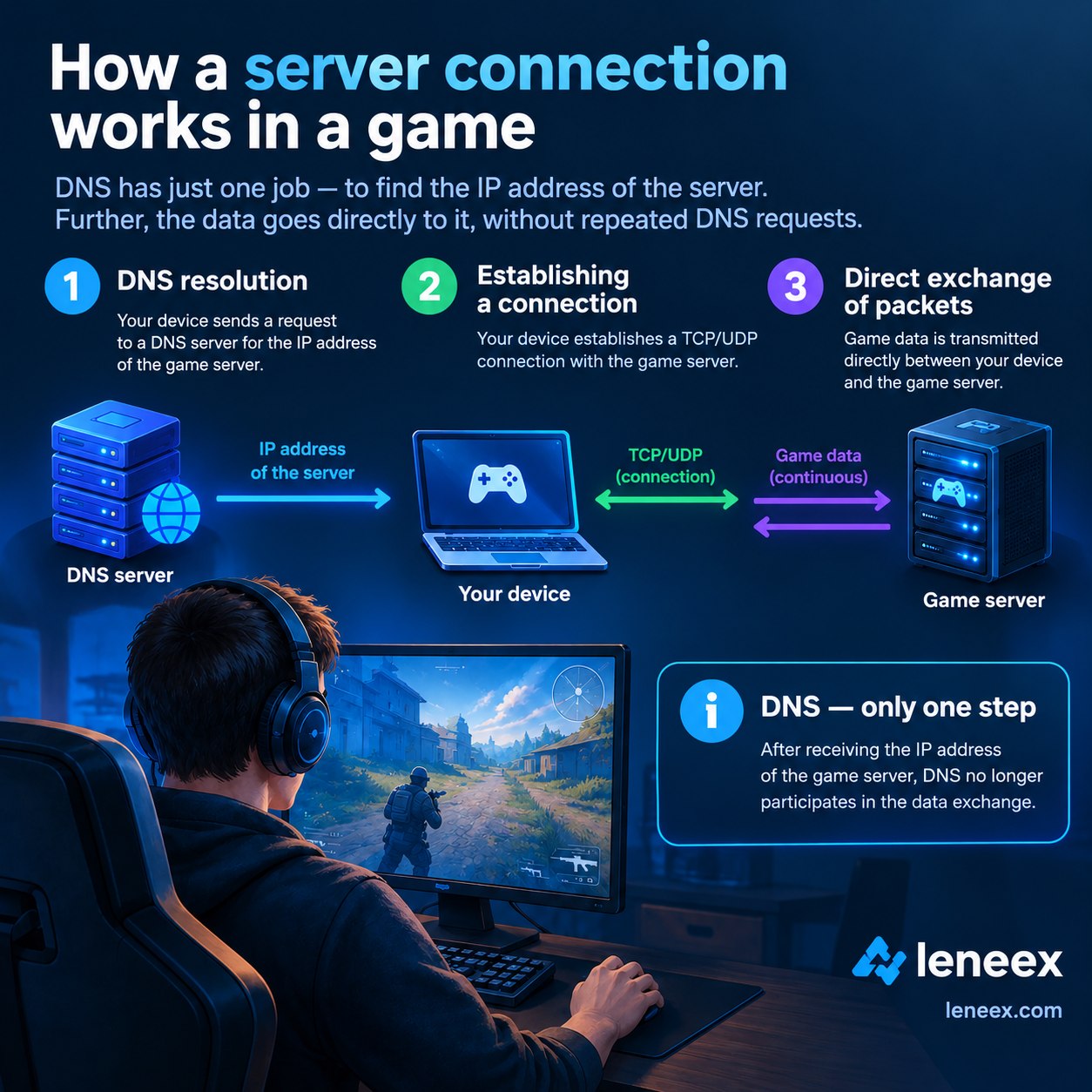
Here's how the process plays out:
The game client requests the domain name.
The DNS server resolves the corresponding IP address.
The client receives the IP address and establishes a connection with the target server.
During gameplay, data travels directly between the client and the game server over the established network connection.
And that's where the key distinction lies. DNS resolution time is part of the connection-establishment process, while in-game ping is the latency of packet exchange with the server. If a DNS server took, say, a few dozen milliseconds to respond to a query, that doesn't mean those milliseconds get added to every single game packet afterward. DNS isn't involved in processing every single action the player makes.
Modern games and launchers typically reach out to several different domains: one for authentication, one for the store, one for the update system, one for the game API. DNS can influence the speed of those individual operations, but that's still not the same thing as ping during an actual match.
What actually determines in-game ping
Ping shows how fast a network packet travels from your device to the game server and back. When you're troubleshooting latency issues, the first thing to look at is the network route — not DNS.
Ping is affected by:
Physical distance to the game server. This one's obvious — the farther the server, the higher the potential latency.
The route through your ISP's network. Packets pass through multiple network nodes, or hops. A suboptimal route increases latency.
Quality of your internet connection. Network congestion, packet loss, and an unstable connection noticeably degrade gameplay and make the experience far less enjoyable.
Network load. Downloading large files in the background can also increase latency, especially if bandwidth is limited or the connection is saturated.
Load and overall health of the game server itself. Problems on the game's side tend to show up sharply as high ping.
Connection type. Always factor in how you're connected to the network. Wi-Fi tends to produce inconsistent latency. Want solid ping? Consider a wired connection.
And keep these connection metrics straight: ping is latency, packet loss is lost packets, and jitter is variation in latency over time. They often feel similar in-game, but the underlying causes are different.
If your actual goal is controlling the route to the server, DNS isn't the main tool for that either. For a self-hosted game server or proxy, what matters most is the server's physical location and its network route.
When choosing a VPS, pay attention to the data center's location relative to your players and the networks you need. Leneex offers server locations across multiple regions, so in scenarios like this, picking the right region matters far more than picking the right DNS.
When DNS can still be indirectly involved
A common scenario: the game launches but shows "Connecting to server" for a long time. Once connected, ping settles at a stable 40 ms (just an example figure). What does this tell you? In this case, the issue genuinely could be at the DNS stage. If the DNS server in use is slow or temporarily unavailable, the client needs more time to resolve the IP address of the target service.
There's another possible scenario — issues with the DNS cache. If your device or network has stale or incorrect DNS information cached, it can interfere with reaching the right address. That said, it's important to distinguish between two things: time to start the session versus latency within the session. DNS can affect the former, but it generally doesn't determine the latter. If the game has already connected to the server and, mid-match, ping suddenly jumps from a steady 30 ms to 150 ms, blaming DNS alone would be the wrong call.
Myths about "gaming DNS" and ping boosters
You'll find services and recommendations online promising to lower your ping just by switching your DNS. That claim alone deserves some skepticism. If a user gets a different ping after changing DNS, that doesn't prove the DNS resolution itself is what caused the improvement. Often, what these services market as "DNS optimization" is actually relying on other mechanisms underneath — proxies, tunnels, or altered traffic routing.
And in that case, any real effect comes from routing changes, not from DNS queries suddenly being resolved faster. You can't universally claim that switching to a "gaming DNS" automatically lowers ping. The actual result depends on the specific network, ISP, route, and the game service's infrastructure.
Conclusion
If you're experiencing high ping during gameplay, switching your DNS is almost never the real fix. DNS is responsible for resolving domain names and mainly affects how quickly the client locates the right server. Once the connection is established, latency is determined by the network route, distance to the server, connection quality, and the state of the game's infrastructure.
When troubleshooting ping issues, it makes more sense to check your route and connection stability first, rather than simply switching DNS providers. And if you need not just to diagnose the problem but to actually control the route — for a self-hosted game server or proxy — the right place to start is choosing a suitable physical server location.