
IOPS (Input/Output Operations Per Second) is the number of read and write operations a storage drive can perform in one second. This metric shows how well a disk handles a large volume of data requests, and it's especially important for websites and databases under load. In simple terms, IOPS doesn't tell you how fast a disk can transfer one large file — it tells you how many individual operations it can process per second. The difference might sound minor. In practice, it's enormous.
What makes up IOPS
A disk is constantly handling input/output operations: it receives a read request, writes data, queries a database, opens a file. Each of these operations takes a certain amount of time. When measuring IOPS, several parameters typically come into play. Random IOPS is the number of random read or write operations, where requests hit different areas of the drive. Sequential IOPS is the number of sequential operations, where data is read or written in adjacent blocks.
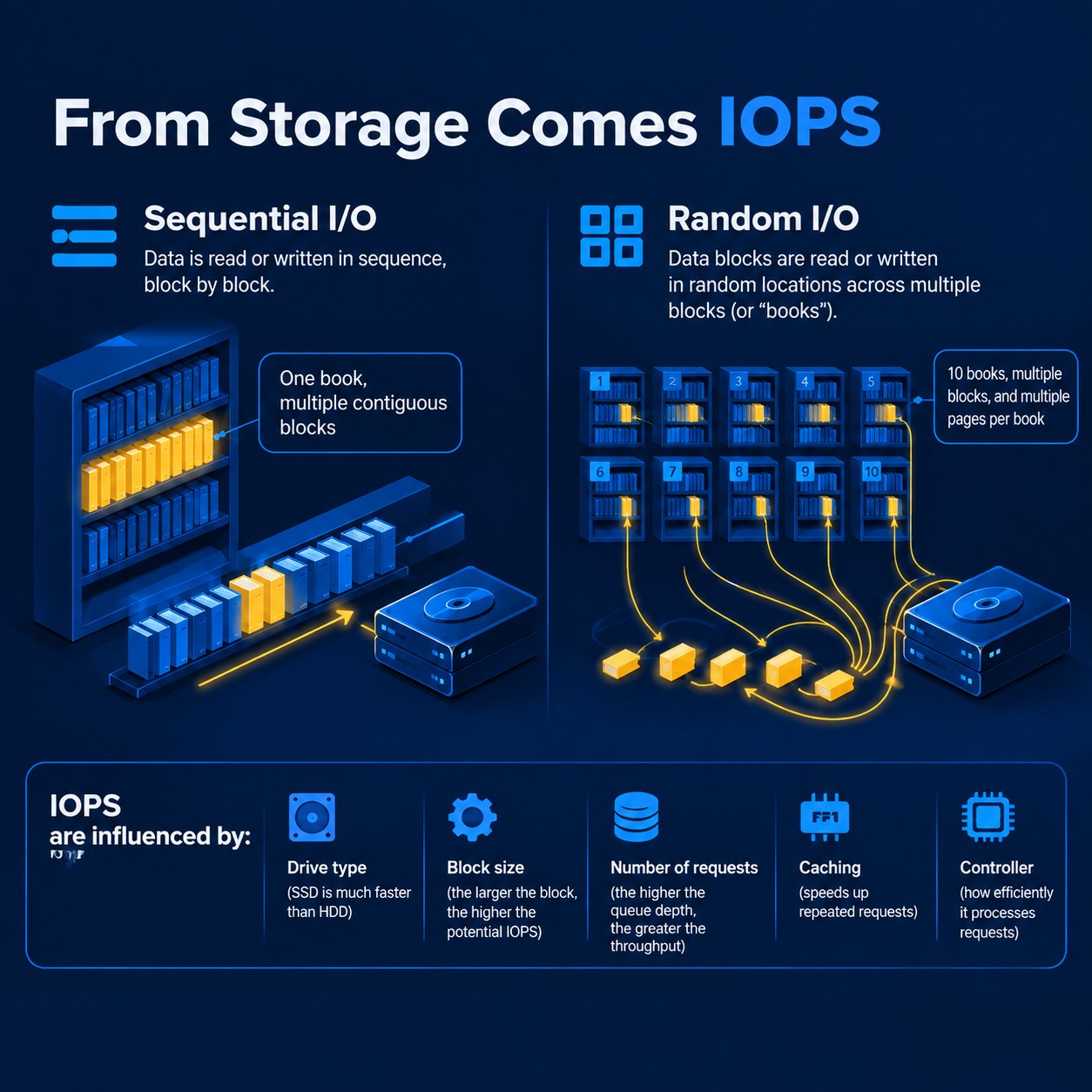
Random IOPS matters most for web servers and databases. A server rarely works with one huge file from start to finish. Instead, it's constantly accessing many small fragments of data at once: database records, PHP files, cache, indexes, and service data. Think of a library. Sequential reading is like picking up a book and reading it cover to cover. Random reading is needing a page from ten different books every few seconds, with those books scattered across different shelves. In the second scenario, what matters is how fast you can handle a large number of small requests.
IOPS and latency
Latency is the time that passes between an I/O request and its completion. The lower the latency, the faster the drive responds to individual requests. IOPS and latency are closely related. If a single operation takes a long time to complete, the drive physically can't process a large number of such operations per second under the same test conditions. But they're not the same thing. IOPS measures quantity; latency measures the wait time for a single operation.
IOPS and throughput
Throughput is the amount of data a drive can transfer per unit of time, usually expressed in MB/s or GB/s. This is yet another characteristic. A drive can have high throughput and perform great when copying large files, yet be far less impressive when handling many small random requests. The statement "this disk runs at 7 GB/s" tells you nothing on its own about its performance under database workloads.
IOPS on HDD, SSD, and NVMe — what's the difference
The main reason drives differ comes down to how they're built. Inside an HDD, magnetic platters spin, and a read/write head physically moves to the required location. When a server makes random data requests, the head has to keep repositioning. It's a mechanical process.
An SSD has no moving parts. Data is stored in flash memory, so the drive doesn't need to physically move a head between sections. As a result, the number of I/O operations it can handle is significantly higher.
NVMe takes this further. It's a protocol for communicating with fast SSDs, designed to work over PCIe with a large number of parallel request queues. That's why NVMe drives are particularly well suited for workloads where a server is constantly accessing data.
Criterion | HDD | SSD | NVMe |
How it works | Spinning magnetic platters and a moving head | Flash memory, no moving parts | Flash memory, connected via PCIe using the NVMe protocol |
Random access | Weak point: the head has to physically move | Handles this far better than HDD | Typically the best of the three options |
Latency | Highest | Low | Lowest |
Parallel requests | Limited by mechanics | Handled well | Best option: many parallel queues |
Best suited for | Archives, backups, storing large files | Websites, CMS platforms, small to medium databases | High-load databases, online stores, CRM systems, many simultaneous requests |
You can't judge a drive purely by its type. Two SSDs can differ significantly in performance, and so can two NVMe drives. Precise IOPS ranges shouldn't be treated as universal here: the result depends on the drive model, block size, read/write ratio, queue depth, and other test conditions. If you're choosing a VPS, don't just look at the label "SSD" or "NVMe." What matters is the provider's actual infrastructure and the specific characteristics of its storage subsystem.
Why IOPS matters for a website or server
IOPS becomes noticeable when a server has to handle a large number of simultaneous data requests.
A high-load database. A CRM, online store, forum, or similar service typically runs thousands of small database operations continuously. Here, the speed of the storage subsystem directly affects request processing time.
An online store. A customer opens a product page, the system queries the database, retrieves the price, stock level, specifications, user data, and other information. When many such requests happen at once, poor disk performance becomes a weak point.
WordPress with lots of dynamic operations. A basic WordPress site puts almost no load on the disk. But a complex online store with many plugins, a database, and several simultaneous visitors is a different story altogether. Caching reduces the number of disk requests, but it doesn't eliminate them completely.
Many concurrent connections. A single user rarely generates significant disk load. Hundreds or thousands of parallel requests are a different scenario entirely. The drive has to serve a large number of operations nearly at the same time.
A standard business-card website. Here, IOPS can be almost irrelevant. If the site has only a few pages, low traffic, and most content is served from cache, there's no point choosing a VPS based solely on the highest IOPS figure.
First, you need to identify the actual bottleneck.
How to tell if you have enough IOPS
The simplest approach isn't to look at an impressive number in the server specs, but to watch how your project behaves under load.
Signs of a potential storage subsystem issue:
the database starts responding significantly slower during peak load;
pages take a long time to load specifically when there are concurrent requests;
the server shows high disk utilization;
read and write operations start queuing up while the CPU isn't being used anywhere near full capacity;
the situation barely changes after upgrading CPU or RAM.
In server monitoring, it's best to look at disk load, I/O latency, and read/write operations. The names of these metrics and the monitoring tools available depend on the control panel: FASTPANEL, HestiaCP, cPanel, Plesk, and DirectAdmin each offer a different set of tools. There's one more important point.
High disk load doesn't automatically mean an IOPS shortage. Sometimes the real cause is insufficient RAM, poorly performing databases, lack of caching, unoptimized queries, or simply a slow drive.
You shouldn't diagnose the issue from a single graph alone. If you're getting a virtual server with different tiers of disk performance, IOPS is a factor worth considering when choosing a configuration.
Key takeaways about IOPS
IOPS isn't just an abstract number for server enthusiasts. It's a measure of how well a drive handles a large volume of read and write operations, and as such, it can directly affect the responsiveness of a website, application, or database under load.
Don't chase the highest possible IOPS if your project doesn't need it. For a business-card website, a completely different resource matters more. For an online store, CRM, or an actively used database, the storage subsystem already becomes a meaningful part of overall server performance.
When choosing a VPS, look at the full picture: CPU, RAM, drive type, IOPS, latency, throughput, and your project's actual workload. If you're currently picking a server for your website or application, check out the current Leneex VPS configurations and compare the available options against your project's requirements.