TorrServer is an open-source application. It makes it possible to play content from torrent swarms without downloading the entire file first. TorrServer pulls data over BitTorrent, caches it, and streams it over HTTP. This approach ensures that video or audio starts playing on another device almost instantly, without waiting for the download to finish.
Put simply, TorrServer acts as an intermediary between a torrent swarm and a media player. It can run on a computer, a NAS, or a remote server, and the stream can then be opened on a TV, a set-top box, or a smartphone.
How TorrServer works
A standard torrent client is designed to download a file in its entirety. TorrServer takes a different approach: it fetches the torrent's metadata, establishes connections with available sources, and starts pulling in the pieces of the file it needs. This is a fundamentally different model. The data the program receives is cached and simultaneously streamed to the media player over HTTP.
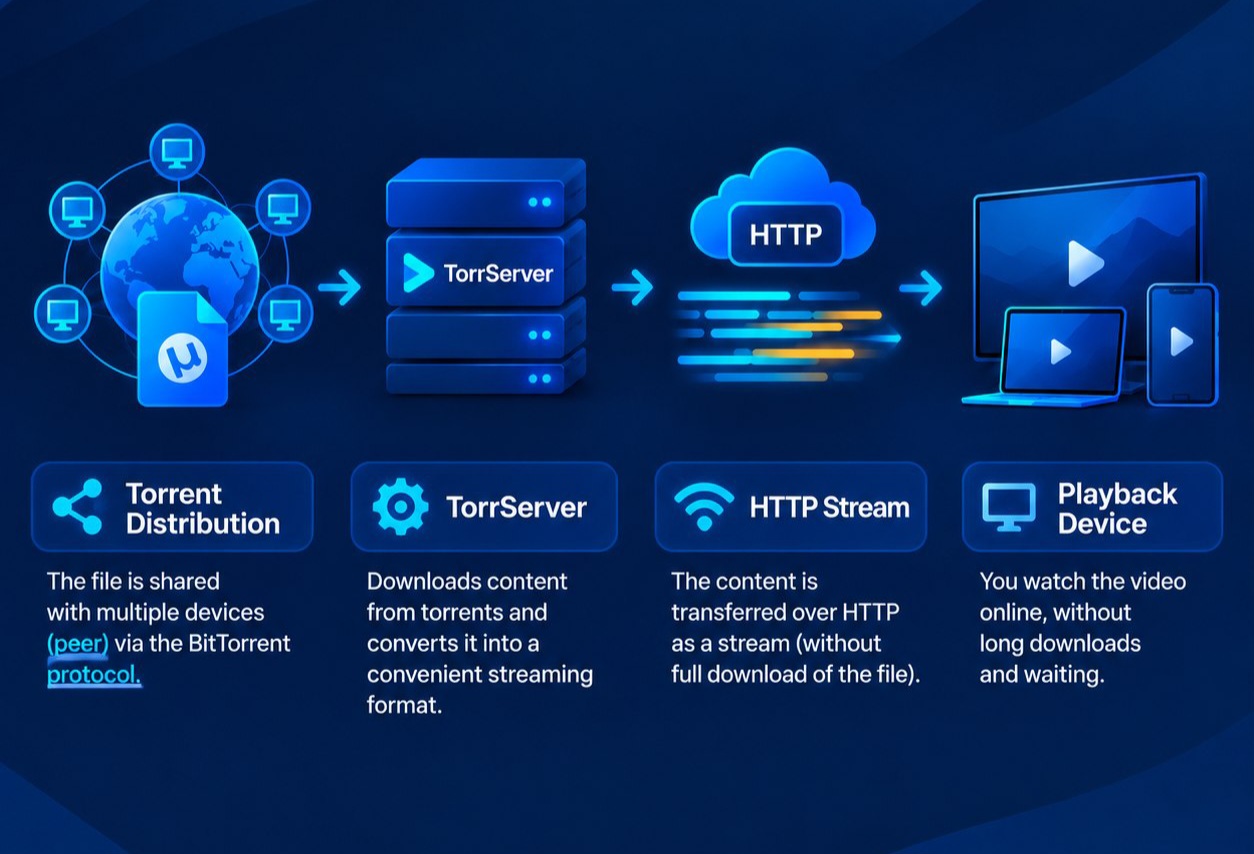
The whole process resembles video streaming: the player doesn't need the entire file to start playback. TorrServer prepares data on demand and hands it off to the player. That said, there's one important nuance — “instant” doesn't mean an instant download. Speed depends on the availability and speed of peers, the quality of the internet connection, and the specs of the device the server runs on.
Another convenience is how TorrServer is managed: users interact with it through a web interface. A nice touch is that the project supports integration with other applications via an API and works with a variety of devices. You can use compatible external players and apps capable of opening an HTTP stream. This separates the server side from the device actually used for watching.
What TorrServer is used for
The goal of TorrServer is to make torrent content available for streaming playback. In effect, it challenges the classic “download the whole file first, then open it” model.
Here are some of the most common use cases for the app:
Watching on a Smart TV. TorrServer is installed on a computer, NAS, or another device on the home network, and playback happens on the TV through a compatible app or player.
Working with media players. TorrServer's HTTP stream works with compatible players and media systems. Depending on the specific setup, this lets you play content through a familiar interface.
Using it on set-top boxes. The set-top box can act purely as a playback device, while TorrServer handles fetching and caching the data.
Watching on a phone or tablet. There's no need to save the video file to the device's internal storage first: the stream comes from TorrServer over the network.
Accessing a media library from multiple devices. A single TorrServer instance can serve as a content source for several compatible devices, although the actual load depends on the number of simultaneous streams.
TorrServer is especially handy when you need access to content “here and now” rather than a full download before watching.
Where to run TorrServer — locally or on a server
Many users run TorrServer on a home computer, a mini PC, or a NAS. This setup is convenient if all devices are on the same local network. But running it locally has a limitation: the device has to stay powered on. If the computer is off or asleep, you won't be able to connect to the TorrServer instance running on it. There's another quirk too — the home computer becomes part of the whole setup. It has to handle running TorrServer, storing the cache, and transferring data over the network all at once.
An alternative is to host TorrServer on a remote server or a VPS. In that case, the app can run around the clock regardless of whether the home computer is turned on. The user's device connects to the server over the internet, while the server handles fetching, caching, and streaming the data. A virtual server is particularly appealing if you need 24/7 access to TorrServer and don't want to keep a home computer running all the time. That said, you'll need to factor in the specifics of your plan: network speed, disk capacity, available CPU and RAM, and the provider's terms.
A detailed walkthrough of installing TorrServer on a VPS is a separate, practical topic on its own, so for now it's enough to understand the principle: a VPS serves as an always-on hosting ground for the server-side app.
Is using TorrServer legal
TorrServer itself is just a software tool for fetching, caching, and streaming data, and the question of legality depends primarily on what content is being used through it and what rights you hold to that content. Copyright rules and content-distribution regulations vary by country and by specific situation.
The existence of torrent technology or TorrServer doesn't automatically mean that any content accessible through it can be downloaded or distributed. The tool should be used only with materials for which the user holds the appropriate rights or permission.
Pros and cons of TorrServer
Pros | Cons |
No need to download the entire file beforehand | Stable operation requires an always-available server or computer |
The stream can be delivered over HTTP to compatible devices | Playback speed depends on the availability and speed of peers |
Works with Smart TVs, set-top boxes, and other devices | Requires a stable internet connection |
Comes with a web interface for management | When run on a home PC, the computer must stay powered on |
Supports data caching | The cache takes up disk space |
Can run locally or on a remote server | Running it remotely means you need to handle access security separately |
Has an API for integrating with other applications | Compatibility depends on the specific device and player |
TorrServer doesn't replace an internet connection or the swarm's own sources. It simply organizes the retrieval of torrent data and delivers it in a form convenient for playback.
Conclusion
TorrServer solves a simple problem: it turns a torrent swarm into a stream that can be played through compatible devices and apps without waiting for the full download to finish. For home use, a computer or a NAS is enough, but that setup depends on whether the device stays powered on. If you need constant access to the server, TorrServer can be hosted on a VPS and left running 24/7.
If that's the setup you're after, the next step is installing TorrServer on a VPS — and that's where it becomes important to work out server selection, app configuration, external access, and security.