VPS (Virtual Private Server) is a virtual server running inside a physical server. It operates thanks to virtualization technology. It gets its own virtual configuration — CPU resources, RAM, disk, network settings, and an operating system — and the user can manage the server with root access.
In simpler terms, a VPS is a middle ground between regular shared hosting and a physical dedicated server: you get more resources and control than on shared hosting, without having to buy an entire physical machine.
How a VPS works under the hood
At the core of a VPS is a physical server in a data center. It runs special software called a hypervisor. Thanks to the hypervisor, the resources of the physical machine can be split between several isolated virtual servers. Each VPS operates as a separate server with its own OS, file system, IP address, and settings. The user doesn't manage the physical server itself but gets control over their own virtual machine. It's perfectly normal for several VPS instances to run on a single physical server at once.
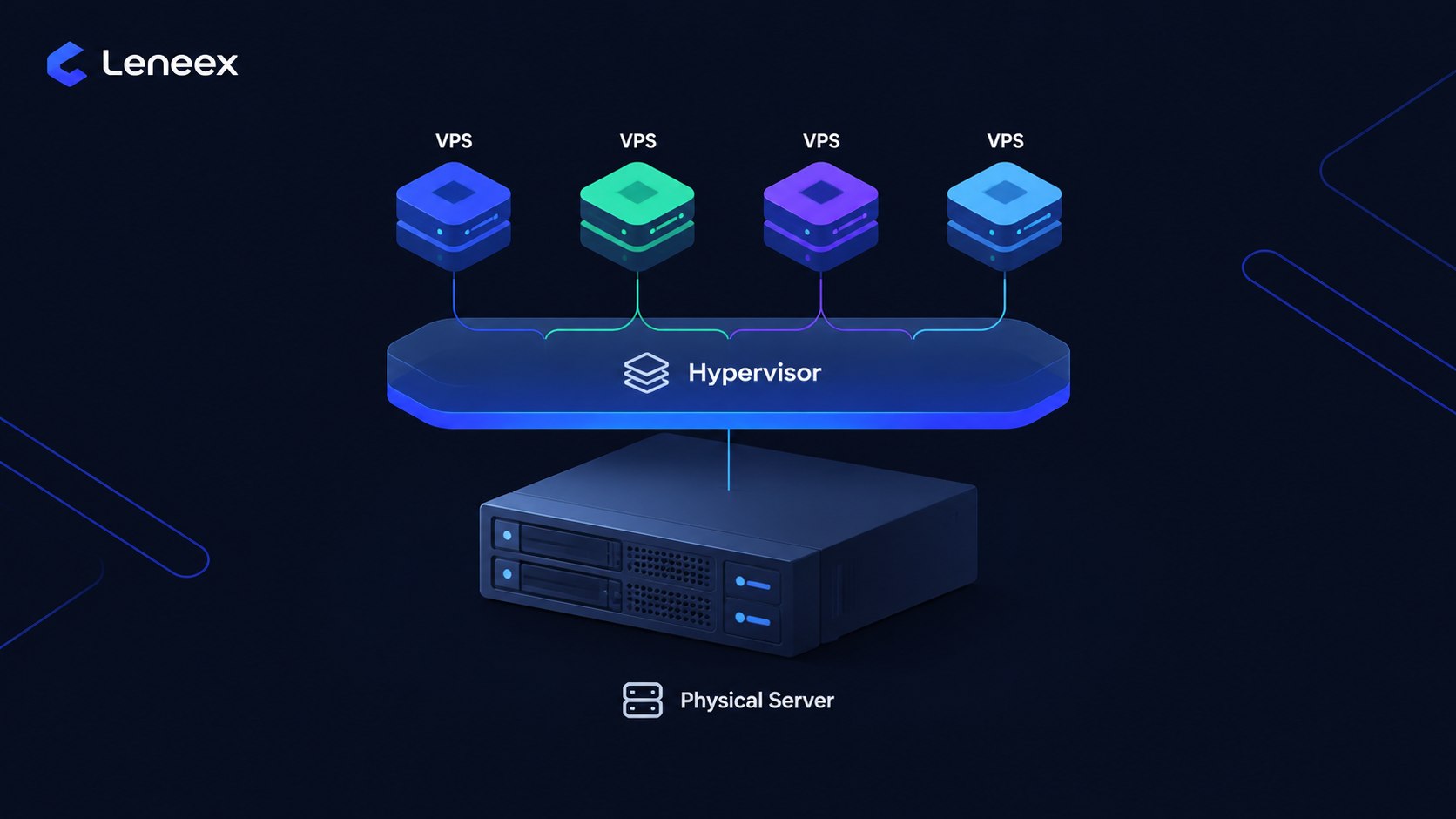
One user installs Ubuntu and WordPress on their server, another installs Windows and an application, a third sets up a database. They all live on the same physical machine but run in isolated virtual environments. From the user's perspective, it looks like this: somewhere in a data center there's a dedicated computer you can manage and interact with, but you don't have to maintain the hardware itself. One of the key advantages of a VPS is root access. Unlike shared hosting, users get the tools to install software, configure a web server, firewall, database, Docker, and other components on their own.
The term "dedicated resources" doesn't always mean that a physical CPU core belongs exclusively to one client. 2 vCPUs represent a dedicated amount of virtual processing resources, but the underlying physical CPU may still serve several virtual machines. When choosing a VPS, look not only at the core count but also at the other conditions of the plan.
How a VPS differs from shared hosting
With shared hosting, several websites are hosted within a shared hosting environment. The user gets a ready-made platform for their site but doesn't manage the entire server. The CPU, RAM, and other resources of the physical server are shared among many clients. If one site generates heavy load, some configurations may experience resource shortages affecting neighboring projects. Hosting providers usually set certain limits so that a single account can't consume the whole server.
With a virtual server, the mechanics work a bit differently. The user gets a separate virtual machine with a specific set of resources and an operating system. They can install software and change the server configuration on their own.
Criterion | Shared hosting | VPS |
Resources | Shared hosting environment, with account limits | Dedicated virtual configuration |
Root access | Usually not available | Available |
Installing your own software | Limited to what the hosting platform allows | Almost any compatible software |
Server management | Minimal | Full or near-full control |
Web server configuration | Limited | Can be configured independently |
Price | Lower | Higher |
Best suited for | Simple sites and projects with no special server requirements | Sites, apps, and services that need greater control |
Shared hosting has an obvious advantage: there's no need to administer Linux yourself, configure a web server, or keep up with updates. For a small website, that's enough. VPS makes sense once a ready-made environment is no longer enough — when you need your own software, a non-standard configuration, Docker, separate services, or full root access.
Leneex offers both options — shared hosting and VPS — so you can move from a basic hosting plan to a virtual server exactly when your project starts bumping into the limits of shared hosting.
How a VPS differs from a dedicated server
A dedicated server is an entire physical machine assigned to a single client. All its processors, RAM, and storage are at the disposal of one user. A VPS uses virtual resources within a physical server, so it's usually cheaper and lets you choose a configuration more flexibly. A dedicated server makes sense when a project needs serious processing power, maximum control over the physical hardware, or a very specific configuration.
If you want to dig deeper into choosing between virtual and physical infrastructure, you can also compare VPS with dedicated servers in the article "Cloud Server or Dedicated Server: Which One Should a Small Business Choose?"
What VPS is used for
A VPS isn't just for hosting a website. It's essentially a standalone server where you can run various applications and services:
Websites with moderate or growing traffic. An online store built on WordPress or another CMS that has already outgrown regular shared hosting.
Online stores. A VPS lets you configure the web server, PHP, database, caching, and additional services yourself.
Applications and web services. A virtual server is a convenient place to host your own app, API, or backend.
Staging and test environments. Developers can spin up a separate server to test updates and new app versions before releasing them.
Self-installed applications. WordPress, Ghost, Nextcloud, and other software that needs its own server environment.
Development. A VPS is handy as a remote Linux machine for development, automation, CI/CD, and other tasks.
At Leneex, some applications from the marketplace can be deployed on a VPS with a single click. That's convenient when you need more than just a "blank server" — a ready-made foundation for a specific project.
How to choose a VPS as a beginner — what to pay attention to
When choosing your first VPS, you don't need to understand every detail of virtualization. It's enough to check a few basics.
CPU
The number of virtual CPUs affects the server's ability to handle parallel tasks. You don't necessarily need to pick a plan with lots of cores right from the start. For an ordinary website, that would be overkill anyway — and as the project grows, it's easy to scale the server later. For an online store, a database, or an application, requirements are usually much higher.
RAM
For databases, CMS platforms, Docker, and several services running simultaneously, RAM matters just as much as — or more than — the CPU and core count. It's important to understand that insufficient RAM leads to swap usage and reduced performance.
Disk
Pay attention not just to capacity, but also to the storage type. SSD and NVMe are preferable for server workloads with a lot of read/write operations.
Server location
It's best to choose a data center close to your project's main audience. The shorter the network path between the user and the server, the lower the potential latency. If a site is aimed mainly at European users, it makes sense to consider a data center in Europe.
Control panel
For a beginner, an intuitive control panel makes working with a server much easier. Instead of relying constantly on the command line, some tasks can be done through a web interface. If you don't have much Linux administration experience, a VPS with a suitable panel can be far more convenient than a bare server you have to manage exclusively over SSH.
At Leneex, you can choose a VPS with a control panel depending on the options available for a specific plan. Before ordering, check the current list of panels and the terms of use.
Support
For your first VPS, support is especially important. Even on a self-managed server, you may sometimes need help with networking, reinstalling the OS, or issues on the infrastructure side.
Bottom line
A VPS is a virtual server with its own operating system, a dedicated resource configuration, and root access. It gives you more freedom than shared hosting without requiring you to pay for an entire physical server.
Shared hosting is enough for a small website. But if you need your own software environment, custom settings, Docker, applications, or greater control over the server, a VPS becomes the logical next step. If your project has already outgrown the limits of shared hosting, you can check Leneex's current VPS plans and pick a configuration for your specific needs — without jumping to an expensive dedicated server ahead of time.
FAQ
Are VPS and VDS the same thing?
VPS and VDS refer to essentially the same type of service — a virtual server. The difference depends on the terminology used by a specific provider: some use VPS as a general term, while others use VDS for plans with stricter resource guarantees or a particular type of virtualization.
Do I need technical skills to use a VPS?
Basic knowledge of Linux and the command line is helpful, especially if you need to administer the server yourself. A control panel makes things much easier, and for some tasks there are ready-made images and one-click application installs.
How much does a VPS cost for a beginner?
The price depends on the number of CPUs, RAM, disk size, location, control panel, and other parameters. Before buying, it's best to check the current pricing of a specific provider, since prices and configuration bundles can change over time.
Can I switch from shared hosting to VPS later?
Yes. This is one of the most common scenarios: a site is first hosted on shared hosting, and as requirements grow, it's migrated to a VPS. Migration typically involves copying files and the database, setting up the VPS environment, and switching DNS.
Is a VPS the same thing as a cloud server?
Not necessarily. A VPS and a cloud server can look very similar to the end user, but the underlying infrastructure can differ. A traditional VPS often runs on a single physical host, while a cloud virtual machine may rely on distributed infrastructure spanning several physical servers.